Creating Manufacturing Orders in Odoo
In this post we explain how to manufacture with Odoo using the Manufacturing (mrp) module. We will create the Manufacturing Order manually and record the production in the simplest possible way.
Before creating Manufacturing Orders, it is important to have created quality master data, in this case mainly Products and Bills of Materials.
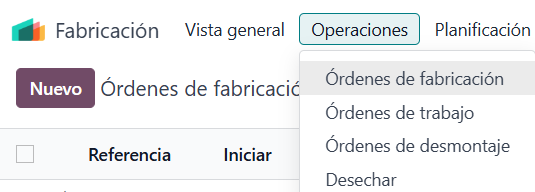
To create a Manufacturing Order, follow the path: Manufacturing --> Operations --> Manufacturing Orders --> New.
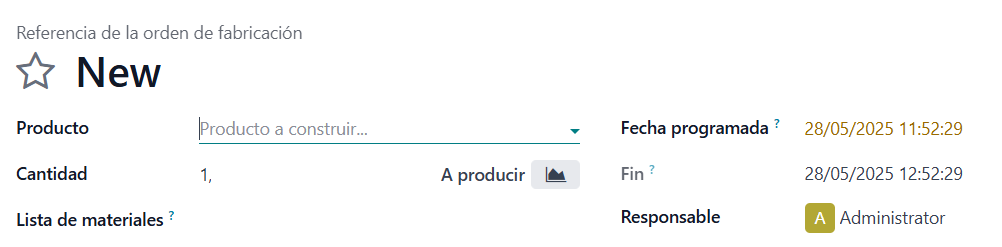
The information contained in a Manufacturing Order is as follows:
- Product: The item we will actually produce.
- Quantity: The number to produce.
- Bill of Materials: The relationship between the Product to be manufactured and its Components.
- Scheduled Date: The planned start date of production.
- End: The planned or actual production closing date, depending on the status of the Manufacturing Order.
- Responsible: The person/user in charge of the Manufacturing Order.
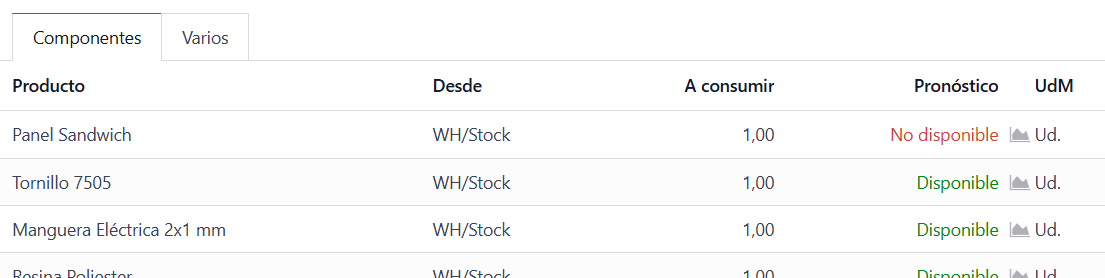
As soon as we fill in the Bill of Materials field, the Components tab is filled in automatically, consisting of the following fields:
- Product: Shows the components needed to carry out production. These Products can be raw materials or intermediate products, that is, Products that in turn contain a Bill of Materials and can also be manufactured.
- From: Warehouse location from which the Stock of those Products will be consumed.
- To Consume: The quantity that, according to the Bill of Materials, is planned to be consumed to carry out this Manufacturing Order.
- Forecast: Shows the Stock availability of the component Product.
- UoM: The component's unit of measure.
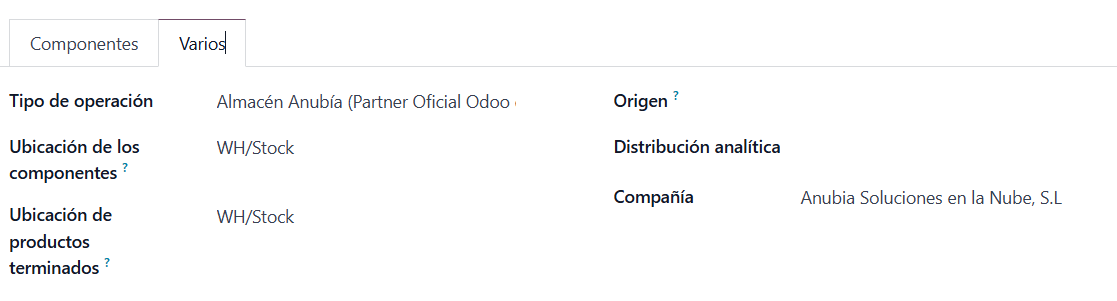
Within the Manufacturing Order there is also the Miscellaneous tab with the following fields:
- Operation Type: The operation type configured in the Inventory app.
- Components Location: The location where Odoo will look for the components' Stock.
- Finished Products Location: The Warehouse location where the finished product's Stock will be generated.
- Source: A field that can be filled in manually or automatically. If it is filled in automatically, it refers to the document or model that gave rise to this Manufacturing Order.
- Analytic Distribution: Only visible if certain settings are enabled in Odoo. It allows analytic management of manufacturing.
- Company: Only visible in a Multi-company environment. It refers to the Company this Manufacturing Order belongs to.
Manufacturing Orders have Statuses. In this case, since we created the Manufacturing Order manually, the order is created by default in Status = Draft.

If we click Confirm, the order moves to Status = Confirmed. At this point the component stock is reserved and the stock of the product to be manufactured is taken into account in the Forecasted or Projected Stock.
At that same moment, two new columns appear in the Components tab:
- Quantity: Shows the reserved quantity of that component.
- Consumed: A purely indicative checkbox, related to the Manual Consumption column of the Bill of Materials.
Once the order is in Status = Confirmed, we have the option of recording production using Produce All.

When you click Produce All, the order moves to Status = Done, the component stock is actually consumed and the stock of the manufactured product is created.
There are other possible statuses for a Manufacturing Order (In Progress and To Close), but they depend on the Manual Consumption option and on Work Orders or Partial Productions, and we will explain them in other posts.
Keep learning about Odoo
- Bills of Materials for manufacturing in Odoo
- Manufacturing orders and work orders in Odoo
- Three-step manufacturing in Odoo
- Odoo Manufacturing
Want to implement Odoo Manufacturing in your company? At Anubía we help you configure it according to your processes. Contact us.