Kit-Type Bills of Materials in Odoo
In this post, we will focus on creating a bill of materials to build a Kit product. This bill of materials will be the essential tool for correctly creating the delivery order linked to a sales order when we sell a Kit.
A bill of materials in Odoo can be created from the product form itself or from the path: Manufacturing → Products → Bills of Materials → New.
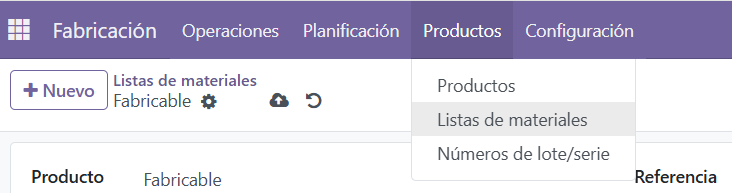
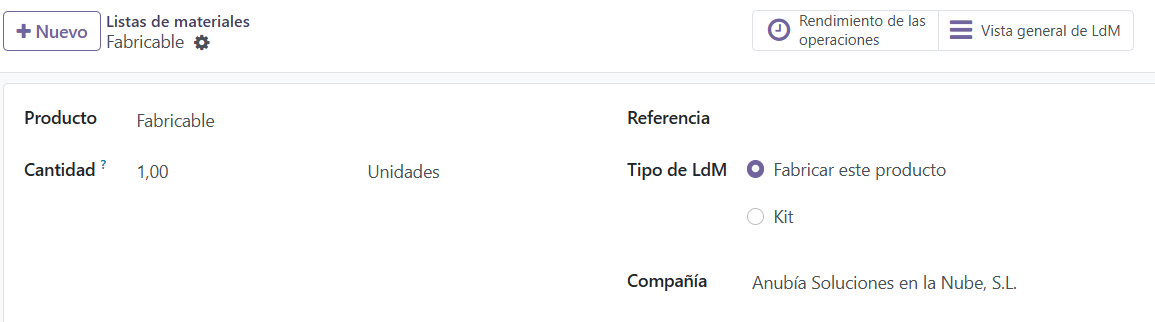
Bill of Materials Form in Odoo:
- Product: In this case, the item we are going to build as a Kit. It can be a finished or intermediate product.
- Quantity: Amount and unit of measure to which this bill of materials applies.
- Reference: Name and/or code of the bill of materials.
- BoM Type: In this case we will select Kit.
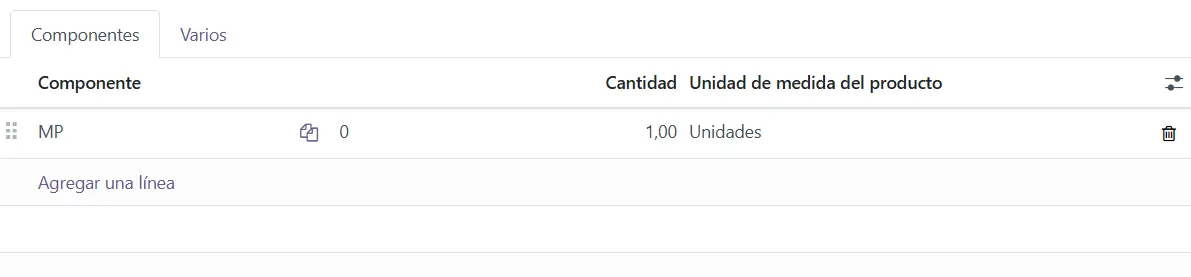
Bill of Materials Form Tabs in Odoo:
- Components: In this tab we list the components of this bill of materials. They can be storable products, consumables or even services. To add a component, click Add a line.
- Component: Product that will be shown on the delivery order as a component of the Kit.
- Quantity: Amount required to build the Kit of this bill of materials.
- Product Unit of Measure: The unit of measure of the component. As a rule, it comes from the product form.
Once our Kit bill of materials has been created, we would create a quotation/sales order as usual. When the sales order is confirmed, Odoo will create its related delivery order.
In this case, the delivery order will show the Kit product included in the sales order, but it will also show, both on screen and in the PDF, the components of the Kit.
Keep learning about Odoo
- Types of bills of materials in Odoo
- Bills of Materials for manufacturing in Odoo
- Subcontracting with Bills of Materials in Odoo
- Odoo Inventory and Warehouse y Odoo Sales
Want to implement Odoo Inventory in your company? At Anubía we help you configure it according to your processes. Contact us.